
Start Here:
This is a step by step I would take, If I was starting from zero again. Showing you what would be the most efficient path to become DevOps engineer based on the knowledge that i have now.
I hope with this i can help you in this highly rewarding, but challenging journey into DevOps
And I wanted to make it more individual for you based on your background from which you are transitioning into DevOps
- System Administrator
- Software Developer
- Test Automation Engineer
- Network Engineer
- Someone with zero or very little IT knowledge
So after the DevOps roadmap, you will find information on how to start in DevOps having any of these backgrounds.
One Important thing beforehand:
Since DevOps covers the whole software development lifecycle, it means you work with lots of technologies. Plus DevOps is still evolving and there are lots of new tools behind developing all the time.
So you have to be comfortable with constantly learning and expanding your knowledge. Even after you have become a DevOps Engineer
What is DevOps?
DevOps is a methodology that has developed from the best practices and experiences associated with managing the development, testing, and support processes within the software development life cycle. This framework enables organizations to optimize their approach to development, tool deployment, integrated testing, and overall productivity enhancement.
Furthermore, DevOps assigns the critical responsibilities of continuous integration and continuous deployment to the DevOps engineer, emphasizing the importance of these functions. In recognition of the substantial benefits associated with DevOps, many organizations promote the enrollment of employees in formal DevOps training programs to facilitate the implementation of these practices in their daily operations.
Historically, the development, testing, and support departments functioned in isolation, which resulted in process gaps and conflicts in responsibility due to the fragmented nature of these roles. Such divisions often led to misunderstandings, miscommunications, and prioritization conflicts, ultimately undermining productivity and leading to customer dissatisfaction.
The evolution of DevOps as both an approach and a professional role aims to significantly mitigate these issues by fostering greater collaboration and integration across teams.
What is a DevOps Engineer?
A DevOps engineer ensures the smooth operation of a company’s IT infrastructure by collaborating with developers on code deployment and with operations staff to maintain system efficiency. This role requires a strong technical background and an understanding of both development and operations processes.
As businesses increasingly rely on technology, the demand for DevOps engineers is growing. If you have a technical background and enjoy working across teams, a career as a DevOps engineer might be ideal for you.
DevOps Engineer Job Description
The role of a DevOps engineer is crucial to a project’s success, encompassing all stages from planning to supporting key performance indicators (KPIs) like customer satisfaction and productivity. They facilitate the integration of project functions throughout the product lifecycle, including planning, building, testing, deployment, and support.
DevOps engineers should be knowledgeable in the technical and IT aspects of integrated operations and familiar with automation tools necessary for process automation and testing. For those interested in becoming a DevOps engineer, understanding the role’s requirements and identifying skills to improve upon is essential. A DevOps career guide can offer valuable insights into career development, necessary technologies, and required skills.
Next, we will look into the specific roles and responsibilities of a DevOps engineer.
DevOps Engineer Job Description: Roles and Responsibilities
A DevOps engineer combines technical and management roles, requiring strong communication and coordination skills to effectively integrate functions and meet customer expectations.
Their diverse responsibilities include:
- Understanding customer requirements and project KPIs
- Implementing development, testing, and automation tools
- Planning team structure and project activities
- Managing stakeholders and external interfaces
- Setting up necessary tools and infrastructure
- Defining processes for development, testing, releases, and support
- Reviewing and validating software code
- Troubleshooting code bugs
- Monitoring processes for adherence and improvement
- Promoting automation where possible
- Implementing cybersecurity measures and conducting risk assessments
- Managing incidents and performing root cause analysis
- Facilitating team and customer communication
- Selecting and deploying CI/CD tools
- Fostering continuous improvement and developing a CI/CD pipeline
- Mentoring team members
- Monitoring customer experience and KPIs
- Reporting progress to management and customers
Essential Skills for a DevOps Engineer
Basic DevOps skills encompass automation, scripting, cloud platforms, CI/CD, containerization and Infrastructure as a Code. These skills are crucial for streamlining software development and deployment processes and fostering collaboration between development and operations teams.
Technical Skills:
- Automation and Scripting:Proficiency in scripting languages like Python or Bash is essential for automating tasks and creating scripts to streamline workflows.
- Cloud Platforms:Understanding and working with cloud platforms like AWS, Azure, or GCP is vital for deploying and managing applications.
- Continuous Integration and Continuous Deployment (CI/CD):Familiarity with CI/CD pipelines and tools like Jenkins, GitLab CI, or GitHub Actions is crucial for automating code integration and deployment.
- Containerization and Orchestration:Knowledge of Docker for containerization and Kubernetes for orchestrating and scaling containers is important for cloud-native applications.
- Infrastructure as Code (IaC):Using tools like Terraform or Ansible to automate infrastructure provisioning and management is a key DevOps practice.
- Version Control:Proficiency in version control systems like Git is essential for managing code changes and collaboration.
- Operating Systems:Familiarity with Linux and Windows operating systems is helpful for system administration and configuration management.
- Networking Basics:Understanding networking concepts is helpful for managing infrastructure and troubleshooting issues.
- Security:Basic understanding of security principles and practices is important for protecting systems and data.
- SQL:Understanding and using SQL for database interaction is helpful for managing data related to applications.
Concepts of Software Development
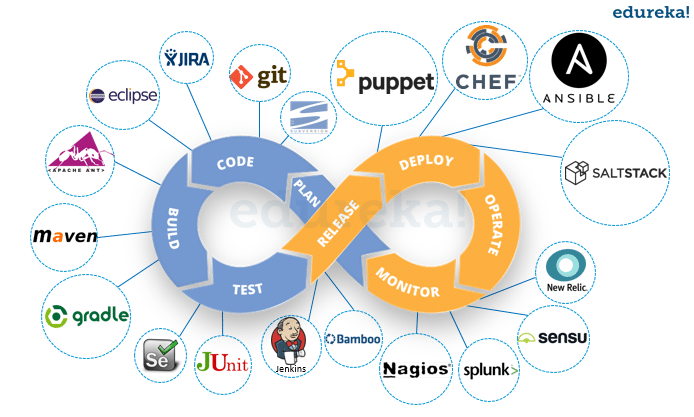
In agile software development, Jira, Git, build and packaging, automated testing, and test scopes are key concepts that contribute to a robust and efficient development process. Jira is used for agile project management. Git provides version control. Build and packaging automate the creation of deployable software packages. Automated testing ensures quality through scripted tests. Test scopes define the areas of the application covered by testing.
1. Jira and Agile Project Management:
- Agile Methodology:Jira supports various agile methodologies like Scrum and Kanban.
- Project Management:Jira helps teams plan, track, and manage agile projects through features like boards, backlogs, and roadmaps.
- Issue Tracking:Jira is used to track individual work items (issues) from creation to completion.
- Workflows:Workflows define the stages of an issue’s lifecycle, allowing teams to visualize progress and manage tasks effectively.
2. Git and Version Control:
- Version Control:Git is a distributed version control system that enables teams to track changes to code over time.
- Collaboration:Git facilitates collaboration by allowing multiple developers to work on the same codebase concurrently.
- Branching:Git supports branching, allowing developers to create separate versions of the code for new features or bug fixes without affecting the main codebase.
3. Build and Packaging:
- Automated Builds:Build systems automate the process of taking source code and converting it into a deployable format (e.g., an executable, a JAR file).
- Packaging:Packaging involves creating the final deployable artifact, which may include libraries, configuration files, and other resources.
- CI/CD Integration:Build and packaging are often integrated into continuous integration/continuous delivery (CI/CD) pipelines, which automate the software development lifecycle.
4. Automated Testing:
- Purpose:Automated testing helps ensure the quality of the software by automatically executing a set of tests to verify its functionality.
- Types of Tests:Common types of automated tests include unit tests, integration tests, and end-to-end tests.
- Integration with Jira:Jira can be used to manage and track automated tests, allowing teams to see the results of test runs and identify any failures.
5. Test Scopes:
- Defining Scope: Test scopes define the specific areas or components of the application that are covered by testing.
- Types of Scopes: Test scopes can vary from very specific unit tests to broad system tests.
- Coverage: Test scopes help ensure that all critical aspects of the application are tested, contributing to the overall quality of the software.

OS & Linux Basics
As a DevOps Engineer you are responsible for preparing and maintaining the infrastructure(servers) on which the application is deployed. So, you need to know the basics of how to administrate the server and install different tools on it.
Basic concepts of Operating Systems you need to understand:
- Shell Commands
- Linux File System & Permissions
- SSH Key Management
- Virtualization

Git – Version Control

Git is an open-source distributed version control system that helps software teams efficiently create projects of all sizes with speed and synchronization.
What is Git?
Git allows software development teams to maintain multiple independent local copies of a project’s codebase, known as branches. These branches can be quickly created, merged, and deleted, enabling experimentation with minimal risk.
Git supports three file states:
- Modified – Changes made but not yet committed.
- Staged- Changes ready to be included in the next commit.
- Committed – Changes saved in the database.
Teams can revert to previous versions if needed, minimizing the risk of permanent damage to the source code.
What is Version Control?
Version control, or source control, tracks revisions, resolves integration conflicts, and manages project artifacts (like design files and data). It enhances communication, change management, and reproducibility among team members, accelerating software delivery. **Why Use Git?** Many developers prefer Git over other systems like CVS and Mercurial due to its speed, adaptability, and stability—qualities vital for fast-paced environments. About 87.2% of developers use Git, making it the best choice for organizations aiming to meet customer demands swiftly. Git’s ability to maintain a complete project history locally allows contributors to work effectively from anywhere, even with poor connections.
So, you need to learn:
- The Core concepts of Git commands like git clone, git branch, git commit, git pull/push, git merge etc
- Bu also how to collaborate on a project, like create pull request, code reviews and branching.
Your files are stored centrally in a remote Git repository on the web. Most popular git repositories are GitHub and GitLab.
CI/CD Pipelines
I can call CI/CD is a kind of the heart of DevOps
In DevOps, all code changes like new features/bug fixes need to be integrated in the existing application and deployed for the end user continuously and in an automated way.
Hence the term: Continuous Integration and Continuous Deployment(CI/CD)
When the feature or bugfix is done, a pipeline running on a CI server(eg: Jenkins) should be triggered automatically, which:
- runs the tests
- packages the application
- builds a container image
- pushes the container image to an image repository
- deploys the new version to a server

There are many CI/CD platforms out there. The Most popular one currently is Jenkins
Other popular ones: GitLab, GitHub Actions(git runners), Travis CI, Bamboo
Skills you need to learn here:
- Setting up the CI/CD server
- Integrate code repository to trigger pipeline automatically
- Build Tools & Package Manager Tools to execute the tests and package the application
- Configuring artifact repositories like Nexus and integrate with pipeline

Containerization – Docker
As containers have become the new standard of software packaging, you will most probably run your application as a container.
This means you need to generally understand:
- Concepts of Virtualization
- Concepts of Containerization
- How to manage containerized applications on a server.

Docker is by far the most popular container technology.
A container is a standard unit of software that packages up code and all its dependencies so the application runs quickly and reliably on any computing environment.
Somethings you should know:
- Run Containers
- Inspect active containers
- Docker Networking
- Persist data with Docker Volumes
- Apply Docker Apps using Docker files
- Run multiple containers using Docker-Compose
- Work with Docker Repository
Infrastructure as Code
Manually creating and maintaining infrastructure is time consuming and error prone. Especially when you need to replicate the infrastructure, eg for a Development, Testing and Production environment.
In DevOps, we want to automate as much as possible and that’s where infrastructure as code comes into the picture

With IaC we use code to create and configure infrastructure and there are 2 types of IaC tools you need to know:
- Infrastructure provisioning
- Configuration Management
Terraform is the one of the popular infrastructure provisioning tool.
Ansible is most popular configuration management tool.

Benefits of having everything as code:
- Encourage collaboration in a team
- Document changes to infrastructure
- Transparency of the infrastructure state
- Accessibility to that information in a centralized place versus being scattered on people’s local machines in the form of the some scripts.
Learn One Cloud Provider
VMware, a global leader in cloud infrastructure and digital workspace technology, offers solutions that can be integral to a DevOps approach. DevOps in a VMware environment involves using VMware suite of virtualization tools to create a more efficient, automated, and agile software development and deployment lifecycle.
Container Orchestration – Kubernetes
Since containers are popular and easy to use, many companies are running hundreds or thousands of containers on multiple servers. This means these containers need to managed somehow.

For this purpose there are container orchestration tools.
Container orchestration tools like Kubernetes automate the deployment, scaling and management of the containerized applications.
So you need to learn:
- How Kubernetes works
- How to administer and manage the K8s cluster
- How to deploy applications on k8s
Specific K8s knowledge needed:
- Learn core components like Deployment, Service, ConfigMap, Secret, Statefulset, Ingress
- Kubernetes CLI(Kubectl)
- Persisting data with k8s volumes
- Namespaces
Scripting Language
Since you are closely working with developers and system administrators to also automate tasks for development and operations, you will need to write scripts and small applications to automate them.
For that, you will need some scripting or basic programming skills.
This could be an OS-Specific Scripting Language like Bash or PowerShell
Bu what’s more demanded is an OS-independent language like Python, Ruby, Go, JavaScript, Typescript
These languages are more powerful and flexible. If you know one of these, it will make you much more valuable as a DevOps Engineer.
There are many programming languages, but i would recommend starting with the language which is easy for you. Ex: Python is widely used, easy to learn and used for many different use cases especially in DevOps.
Summary
🔧 Core Technical Skills:
- Linux/Unix system administration
- Networking basics (TCP/IP, DNS, firewalls, load balancers)
- Scripting: Bash, Python, PowerShell
- Programming fundamentals (e.g. Go, Java, or Ruby — optional but helpful)
⚙️ DevOps Tools & Automation
- CI/CD Tools:
- Jenkins
- GitLab CI
- CircleCI
- Azure DevOps
- Version Control:
- Git (GitHub, GitLab, Bitbucket)
- Configuration Management:
- Ansible
- Puppet
- Chef
- Infrastructure as Code (IaC):
- Terraform (including VMware provider)
- AWS CloudFormation
☁️ Cloud Platforms
- Amazon Web Services (AWS)
- Microsoft Azure
- Google Cloud Platform (GCP)
- Familiarity with cloud-native tools & managed services (e.g. Lambda, S3, AKS, GKE)
🖥️ Virtualization & Infrastructure Management
- VMware (important in many enterprise DevOps environments):
- vSphere / ESXi
- vCenter
- VMware Workstation / Fusion
- NSX (network virtualization)
- vSAN (software-defined storage)
- Integration with Terraform, Ansible, Jenkins
- Other virtualization platforms: VirtualBox, Hyper-V
📦 Containerization & Orchestration
- Docker (building, managing, and running containers)
- Kubernetes (orchestration and deployment)
- Helm (Kubernetes package management)
- OpenShift (optional but valuable)
📊 Monitoring & Logging
- Monitoring:
- Prometheus
- Grafana
- Datadog
- New Relic
- Logging:
- ELK Stack (Elasticsearch, Logstash, Kibana)
- Fluentd
- Splunk
🔒 Security & Compliance
- SSH, VPN, IAM (Identity & Access Management)
- Secrets management: HashiCorp Vault, AWS Secrets Manager
- DevSecOps practices (security testing in CI/CD pipelines)
- Auditing and compliance automation tools
🖥️Scripting
- Even though tools like Terraform, Ansible, and CI/CD platforms reduce the need to manually script everything, scripting is still core to automating, gluing tools together, and handling custom tasks.
🛠️ Why scripting is essential in DevOps:
- Automation: Repetitive tasks like backups, deployments, log rotation, or monitoring checks.
- CI/CD Pipelines: Writing custom build steps or deployment scripts in Bash, Python, or PowerShell.
- System Management: Managing Linux servers, user accounts, file systems, and services.
- Debugging & Troubleshooting: Quick scripts to test APIs, parse logs, monitor processes.
- Tool Integration: Connecting APIs, tools, or creating command-line utilities.
💡 Most common scripting languages:
- Language Used For
- Bash Most common for Linux system automation
- Python More advanced tasks, APIs, file handling, DevOps tools
- PowerShell Managing Windows servers and services
- Groovy Used in Jenkins pipelines
🛠️ Other Useful Skills
- Agile & Scrum methodologies
- Understanding of SDLC (Software Development Life Cycle)
- Database basics: SQL & NoSQL
- Disaster recovery planning
- Incident response & root cause analysis
- Cost optimization (especially in cloud environments)
- API usage and integration
What is most useful & Why?
⭐ Top Major Areas (Must-Know for Most DevOps Roles)
- Linux & Scripting
- Why? Everything in DevOps runs on Linux at some level.
- What to focus on: File system, permissions, processes, cron, networking tools, Bash/Python scripting.
- CI/CD Pipelines
- Why? Automating build, test, and deploy is DevOps 101.
- What to focus on: Jenkins, GitLab CI, Azure DevOps, GitHub Actions — and writing efficient pipelines.
- Version Control (Git)
- Why? It’s the foundation for collaboration, code management, and CI/CD.
- What to focus on: Git basics, branching, merging, pull requests, Git workflows.
- Infrastructure as Code (IaC)
- Why? IaC allows you to manage infrastructure just like application code.
- What to focus on: Terraform (especially popular), basic AWS CloudFormation, integration with CI/CD.
- Cloud Platforms
- Why? Most companies are cloud-first or hybrid now.
- What to focus on: AWS (most popular), Azure or GCP — compute, storage, networking, IAM, basic billing.
- Containers & Orchestration
- Why? Containers make apps portable; orchestration scales them.
- What to focus on: Docker (must), Kubernetes (very important), Helm (optional, but useful)
- Monitoring & Logging
- Why? You can’t fix what you can’t see.
- What to focus on: Prometheus, Grafana, ELK Stack, basic alerting, log aggregation.
- Configuration Management: Ansible, Puppet, Chef (good to know)
⚙️ Secondary (Role-Specific or Advanced)
These are still important but depend on your company’s infrastructure or your career stage:
- VMware / Virtualization (critical in enterprises, less in startups or cloud-native orgs)
- DevSecOps / Security Tools
- Networking Deep Dives (e.g., firewalls, routing, DNS tuning)
- Advanced Cloud Services (e.g., Kubernetes on AWS/GCP, autoscaling groups, serverless)


Leave a Reply